Gamedev basics – libgdx – gravity
- Table of contents
- Gamedev basics – libgdx – gravity
Easy implementation of gravity – is to add velocity and its acceleration.
Preparation: getting the code
Get the project: https://github.com/petrukhnov/libgdx-kotlearn
- Check more detailed guide how to setup development environment: https://randomlab.eu/gamedev-basics-libgdx-draw-a-rectangle/
- Switch to gravity branch on the bottom of the IDE.
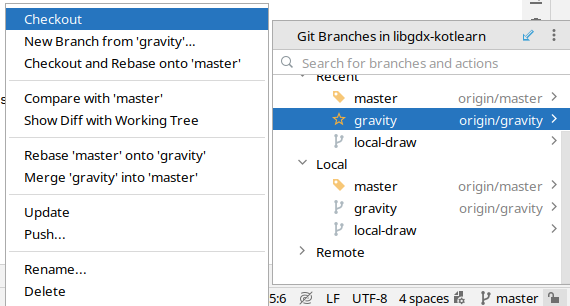
There is already added cat object and simple logic for it to fall and jump.
When game is started there should be moving rectangle.
Gravity is simple
Lets add a cat object, that will store coordinates for imaginary cat. It will be still shown as a rectangle.
Coordinate system
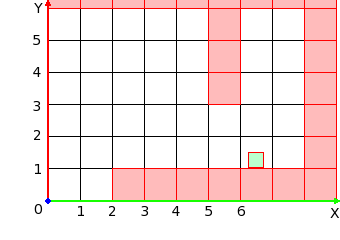
more details here: https://obviam.net/posts/2012/02.libgdx-create-prototype-tutorial-part1/
Drawing object on the coordinates
When values are passed to the rect() function, it allows to modify coordinates in other places of the code, and object will be updated automatically on the screen.
shapeRenderer.rect(cat.x, cat.y, cat.width, cat.height)
Game loop
Libgdx run render() block over and over again. For this article it is a game loop, as there is no separate method for updates.
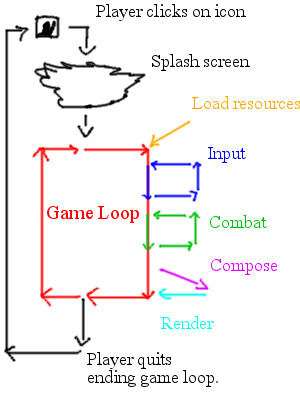
(image from https://www.gamedev.net/forums/topic/694479-i-need-learn-more-about-the-game-loop/)
moving up and down
To move down – decrease value of y coordinate:
cat.y -= 0.1
To move up – increase value of y coordinate:
cat.y -= -0.1
velocity and acceleration
Gravity – is how fast object accelerates downwards.
Accelerates – value is changing (increasing ) over time.
Downwards – position is changed in same direction.
Every iteration of gameloop cat object change its position and velocity.
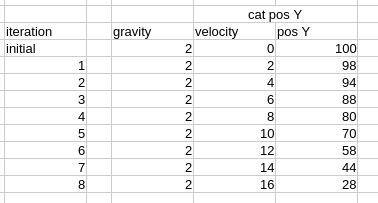
First it moves slowly, but then accelerates. In the table gravity is 2 for better example, in the code gravity is 0.1, so object don’t fall to fast.
vertical stop
When object fall down, at some point it will be stopped. It could be implemented with simple coordinate check. Then object velocity is zeroed, and coordinate adjusted to prevent overlapping with ground/platform.
if (cat.y < 10) {
  cat.y = 10f
  catVerticalVelocity = 0f
}
jumping
Setting velocity to negative, will force cat to move up.
Experiments
Here are few ideas to experiment with:
- modify gravity, so cat fall slower
- modify jump force, so cat jumps higher
- draw platform where cat stops
Updated by konstantin 11 months ago · 4 revisions